Procedure to block an unblock internet sites

Follow this step:
  • Go to Start and type RUN .
  • Type C:\WINDOWS\system32\drivers\etc
  • Open the file "HOSTS" in a notepad
  • Under "127.0.0.1 localhost" . Add IP Name
    IP - IP of the site to be blocked
    Name - Name of the site
Example :
127.0.0.1 localhost
210.210.19.82 www.sifymall.com

Sifymall is now unaccessable . For every site after that you want block , just add "1" to the last number in the internal ip (127.0.0.2) and then the add like before. 


Enjoy :)

Access all blocked websites easily


In most of colleges they blocked the social networking sites on their wifi but if you want to access that blocked sites ??
You can do it after reading this post.

Steps...

1). Open www.google.com
 
2). Type transparent free Proxy address
 free.
 
3). In search result, Click on any of the link for free fresh
 transparent proxy list.
 
4). Now here look for a proxy address with port 8080.

5). Now go to tools menu of your browser.
 
6). Go to Internet options and click on use a proxy
 server for LAN options.
 
7). Type number that you found in the website with 8080
 port.
 
8). Click Ok.
 
9). Now open any website.


Enjoy.. :)

Torrent file download with IDM


=> First goto torrific.com and create an Account...

After Then follow this step...

Choose your torrent file or torrent movie...

1) select a movie of file... lets select a FORCE movie... 
     then after...


2)  Choose thepiratebay.org link...


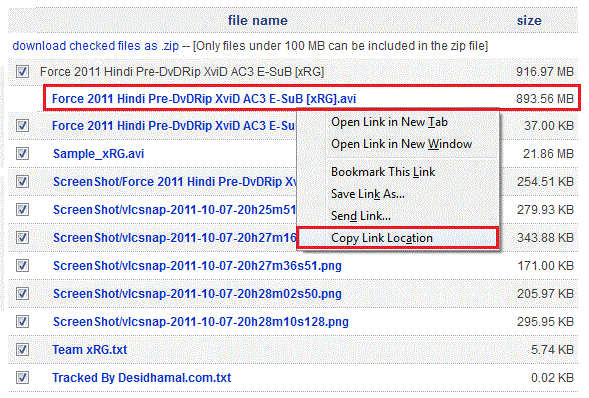
3) Right click this link and select copy link location option...


4) Paste in torrific.com...


and press get button....
and choose initiate bittorrent transmission...


5) choose your movie file and right click on given link and select copy link address...


6) Paste in IDM to add URL...
and Start download...


Enjoy  :)

Windows tricks and cheats

1) Set Processes Priority

Follow this tip to increase the priority of active processes, this will result in prioritization of processes using the CPU.

CTR -SHIFT-ESC

1.Go to the second tab called Processes, right click on one of the active processes, you will see the Set Priority option


2.For example, your Run your CD-writer program , set the priority higher, and guess what, no crashed CD’s


2) Speed Up Menu Display.!!


Start Regedit.
Navigate To Hkey_Current_User\Control Panel\Desktop

 
Select Menushowdelay From The List On The Right.

Right On It And Select Modify.
Change The Value To 0.
Reboot Your Computer.

3) How to make your Desktop Icons Transparent

Go to Control Panel > 
                    System, > 
                Advanced >
    Performance area >
Settings button Visual Effects tab
"Use drop shadows for icon labels on the Desktop"

 
4) Display Message On Startup.


Start Regedit, If You Are Unfamiliar With Regedit Please See Our Faq.


Navigate To Hkey_Local_Machine\Software\Microsoft\Windows Nt\Currentversion\Winlogon

Modify The Key Legalnoticecaption With What You Want To Name The Window.

Modify The Key Legalnoticetext With What You Want The Window To Say. Restart


Google Secret Version

Now i will tell about GOOGLE SECRET VERSION SERVICES...


Now i giving a word and type in Google search box and click i'm feeling lucky.


1). Google 133t
Preview:-


2). Google Gothic
Preview:-

3). XX-KLINGON
Preview:-


4). XX-PIGLATIN
Preview:-
5). Google Easter egg
Preview:-

Enjoy :)