Showing posts with label Dhaval koradiya. Show all posts
how to know WEBSERVER
How to know if web server is windows or Linux based...
there are simple step here...
Microsoft BUGs
Bug # 1
Found that nobody can create a FOLDER anywhere on the Computer which can be named as "CON".
also not create this name as folder...
CON, PRN, AUX, CLOCK$, NUL, COM1, COM2, COM3, COM4, COM5, COM6, COM7, COM8, COM9, LPT1, LPT2, LPT3, LPT4, LPT5, LPT6, LPT7, LPT8, and LPT9
This
is something funny and inexplicable? At Microsoft the whole Team, couldn't
answer why this happened!
This s because these refer 2 some well known ports….
-con corresponds to the console
-Lpt1 corresponds to printer and so on….
Bug # 2
For those of you using
Windows, do the following:
1.) Open an empty notepad file
2.) Type "Bush hid the facts" (without the quotes)
3.) Save it as whatever you want.
4.) Close it, and re-open it.
Noticed the weird bug? No one can explain!
Bug # 3
Again this is something funny and can't be explained?
At Microsoft the whole Team couldn't answer why this
happened!
It was discovered by a Brazilian. Try it out yourself?
Open Microsoft Word and type
=rand (200, 99)
And then press ENTER And see the magic?..!
Bug # 4
Did you know that a flight number from one of the planes that hit one of the two World Track Center towers on 9/11 was Q33N.
In Notepad / WordPad or MS Word, type that flight number Q33N.
Increase the font size to 72. Change the font to Wingdings. ..... u will be
amazed by the findings!!
Enjoy :)
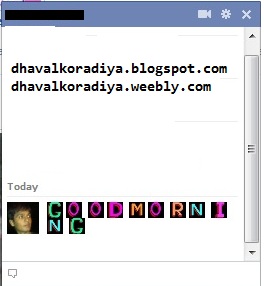
Send Colorful Text in Facebook Chat
You can send a colorful text in Facebook chatbox....
now here text....
A = [[107015582669715]]
B = [[116067591741123]]
C = [[115602405121532]]
D = [[112542438763744]]
E = [[115430438474268]]
F = [[109225112442557]]
G = [[111532845537326]]
H = [[111356865552629]]
I = [[109294689102123]]
J = [[126362660720793]]
K = [[116651741681944]]
L = [[115807951764667]]
M = [[106596672714242]]
N = [[108634132504932]]
O = [[116564658357124]]
P = [[111669128857397]]
Q = [[107061805996548]]
R = [[106699962703083]]
S = [[115927268419031]]
T = [[112669162092780]]
U = [[108983579135532]]
V = [[107023745999320]]
W = [[106678406038354]]
X = [[116740548336581]]
Y = [[112416755444217]]
Z = [[165724910215]]
-:How to use:-
just copy here and paste in chat-box..
and each character between space apply..
Preview:
Download Youtube video with IDM
Easy download youtube video with IDM and any format to u should like .flv .mp4 etc....
it's comfort with Firefox
Step 1: Download Bestvideodownloader and install in your PC.
Step 2: Restart Firefox
Step 3: Open youtube and choose any video you want.
Step 4: Click on Download.
Step 5: Select type to download
Step 6: Open IDM and Paste to AddURL.
Enjoy :)
Desktop triks
1) How to Change User Information in Windows.
Type regedit inside the Run box and hit Enter.
HKEY_LOCAL_MACHINE
Software
Microsoft
Windows NT
Current Version
LOOK RIGHT SIDE PANE
RegisteredOrganization
The name of the organization (Change this to your desired organization)
RegisteredOwner
The name of the user (Change this to your desired name)
2) Run Programs at start up.
Type regedit inside the Run box and hit Enter.
HKEY_LOCAL_USER
Software
Microsoft
Windows
Current Version
Run
CREATE NEW OR Modify/Create the Value Data Type(s) and Value Name(s) as given below:
Data Type: REG_SZ [String Value]
Value Name: [Enter the Name of Program Executable]
Value Data: [Enter the Path to the Program Executable]
Value Name: [Enter the Name of Program Executable]
Value Data: [Enter the Path to the Program Executable]
3) Change logon Screen Background.
NEED: the background should be a .jpg file and it’s size should not exceed 245KB.
save this image as backgroundDefault.jpg.
copy this location:- C:\Windows\system32\oobe\info\backgrounds
You will need to create that path if it does not already exist on your computer.
Type regedit inside the Run box and hit Enter.
HKEY_LOCAL_MACHINE
Software
Microsoft
Windows
Current Version
Authentication
LogonUI
Background
If Background does not exist right click logonUI, select New and then Key, and then name it Background. Now locate OEMBackground (listed on the right side). If it does not exist, right-click Background and select New and then DWORD and name it OEMBackground.
Double-click on OEMBackground and set the Value Data to 1.
Now log-off to see the new logon screen background. If you would like to
revert back to the default background, just set the Value Data back to 0.
4) Trick to Display Your Name With Time in Taskbar
Click on your time in the taskbar and then click on the Change Date and time Setting.
It will open new a window, click on the Change Date and Time Setting.
Now click on the Change Calendar Setting.
Click OK.
PREVIEW:
Enjoy :)
How to Lock your PC when After Wrong Password
=> Start up and open Local Security Policy
=> From the left window pane expand Account Policies and select Account Lockout Policy option in it.
=> Now in the right window pane look for the Account lockout threshold option and double click on it.
=> A new window will be open and give the value after how many invalid password attempts you want to lock your computer.
=> Click on Apply button and a window will be open telling you Account will lock down for 30 minutes.
=> You can also change the time settings by clicking on the Reset account lockout counter according to your need.
=> Click OK.
That’s it. Now your computer will be temporally locked for some time that you had set in the settings when someone will enter wong password.
Enjoy :)
Tricks To Convert Keyboard Into Live Disco
=> Open Notepad
=> And copy this code
Set wshShell = wscript.CreateObject("WScript.Shell")
do
wscript.sleep 100
wshshell.sendkeys "{CAPSLOCK}"
wshshell.sendkeys "{NUMLOCK}"
wshshell.sendkeys "{SCROLLLOCK}"
loop=> and save with .vbs extension
=> Run this application
=> SHOW THE EFFECT ON KEYBOARD...
When those stop it go to START TASK MANAGER
=> Now locate wscript.exe and select it.
=> Click on " End Process ".
Enjoy :)
How To Convert Text Into Audio Using Notepad
This is simple notepad trick that convert any text to audio with just a click.
Using VBScript
1) Open Notepad , and copy/paste following code
Dim msg, sapi
msg=InputBox("Enter your text for conversion–www.dhavalkoradiya.blogspot.com","Text-To-Audio Converter")
Set sapi=CreateObject("sapi.spvoice")
sapi.Speak msg2) Save as .vbs Extension
PREVIEW
Enjoy :)
Use Keyboard As Mouse
Simple...
When mouse isn’t working properly ,
this trick can be very helpful. To
activate mouse keys all you do is press Alt+Left shift key + NumLock
and click OK or press enter .
Use the Numerical pad for controlling the mouse pointer.
5 is for click.
+ is for double click
- for right click.
Enjoy :)
Procedure to block an unblock internet sites
Follow this step:
Enjoy :)
- Go to Start and type RUN .
- Type C:\WINDOWS\system32\drivers\etc
- Open the file "HOSTS" in a notepad
- Under "127.0.0.1 localhost" . Add IP Name
IP - IP of the site to be blocked
Name - Name of the site
Example :
127.0.0.1 localhost
210.210.19.82 www.sifymall.com
Sifymall is now unaccessable . For every site after that you want block , just add "1" to the last number in the internal ip (127.0.0.2) and then the add like before.
127.0.0.1 localhost
210.210.19.82 www.sifymall.com
Sifymall is now unaccessable . For every site after that you want block , just add "1" to the last number in the internal ip (127.0.0.2) and then the add like before.
Access all blocked websites easily
You can do it after reading this post.
Steps...
1). Open www.google.com
2). Type transparent free Proxy address
free.
3). In search result, Click on any of the link for free fresh
transparent proxy list.
4). Now here look for a proxy address with port 8080.
5). Now go to tools menu of your browser.
6). Go to Internet options and click on use a proxy
server for LAN options.
7). Type number that you found in the website with 8080
port.
8). Click Ok.
9). Now open any website.
Enjoy.. :)
Torrent file download with IDM
=> First goto torrific.com and create an Account...
After Then follow this step...
Choose your torrent file or torrent movie...
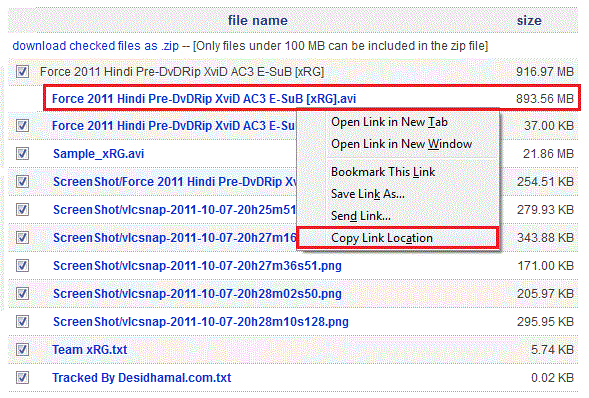
1) select a movie of file... lets select a FORCE movie...
then after...
2) Choose thepiratebay.org link...
3) Right click this link and select copy link location option...
4) Paste in torrific.com...
and press get button....
and choose initiate bittorrent transmission...
5) choose your movie file and right click on given link and select copy link address...
6) Paste in IDM to add URL...
and Start download...
Windows tricks and cheats
1) Set
Processes Priority
Follow
this tip to increase the priority of active processes, this will result in prioritization of processes using the CPU.
CTR -SHIFT-ESC
CTR -SHIFT-ESC
1.Go to
the second tab called Processes, right click on one of the active processes,
you will see the Set Priority option
2.For example, your Run your CD-writer program , set the priority higher, and guess what, no crashed CD’s
Start Regedit.
Navigate To Hkey_Current_User\Control Panel\Desktop
Select Menushowdelay From The List On The Right.
Right On It And Select Modify.
Change The Value To 0.
Reboot Your Computer.
3) How
to make your Desktop Icons Transparent
Go to Control Panel >
System, >
Advanced >
Performance area >
Settings
button Visual Effects tab
"Use drop shadows for icon labels on the
Desktop"
4) Display
Message On Startup.
Start Regedit, If You Are Unfamiliar With Regedit Please See Our Faq.
Navigate To Hkey_Local_Machine\Software\Microsoft\Windows Nt\Currentversion\Winlogon
Modify The Key Legalnoticecaption With What You Want To Name The Window.
Modify The Key Legalnoticetext With What You Want The Window To Say. Restart
Speed up your RAM
To speed up your windows or to increase RAM virtually
1. Right click on My Computer
>> Properties
>> Advanced
>> Performance - Settings
>> Advanced
>> Virtual Memory - Change
Keep the initial size same as recommended and maximum size double of it then restart your system.
It will improve speed of windows and you can play some games which require higher RAM.
2. When a window is active, press the F11 key of the keyboard to get the biggest window possible and press F11 again to restore it.
Enjoy :-)
1. Right click on My Computer
>> Properties
>> Advanced
>> Performance - Settings
>> Advanced
>> Virtual Memory - Change
Keep the initial size same as recommended and maximum size double of it then restart your system.
It will improve speed of windows and you can play some games which require higher RAM.
2. When a window is active, press the F11 key of the keyboard to get the biggest window possible and press F11 again to restore it.
Enjoy :-)
Funny Computer Trick
Check out these funny trick.
>> Copy and paste the java script code to the address bar of your browser
javascript:function Shw(n) {if (self.moveBy) {for (i = 35; i > 0; i--) {for (j = n; j > 0; j--) {self.moveBy(1,i);self.moveBy(i,0);self.moveBy(0,-i);self.moveBy(-i,0); } } }} Shw(6)
>> Press enter and watch your window's "shaking it".
You can change the value of i if you wish :-)
Enjoy :-)
>> Copy and paste the java script code to the address bar of your browser
javascript:function Shw(n) {if (self.moveBy) {for (i = 35; i > 0; i--) {for (j = n; j > 0; j--) {self.moveBy(1,i);self.moveBy(i,0);self.moveBy(0,-i);self.moveBy(-i,0); } } }} Shw(6)
>> Press enter and watch your window's "shaking it".
You can change the value of i if you wish :-)
Enjoy :-)
Subscribe to:
Posts (Atom)